Sadly, log files aren’t always about Kibana, Elasticsearch, OpenTelemetry, or
anything like that. Sometimes it’s just a 500MB dump of whatever was printed to
stdout, stderr, or both. Or maybe a large capture of a serial port (yes,
they are still used). Sure, plenty of times you can just upload a log file to a
large system and try to make sense of it; but that feels like major overkill for
a bunch of printf outputs.
Introduction#
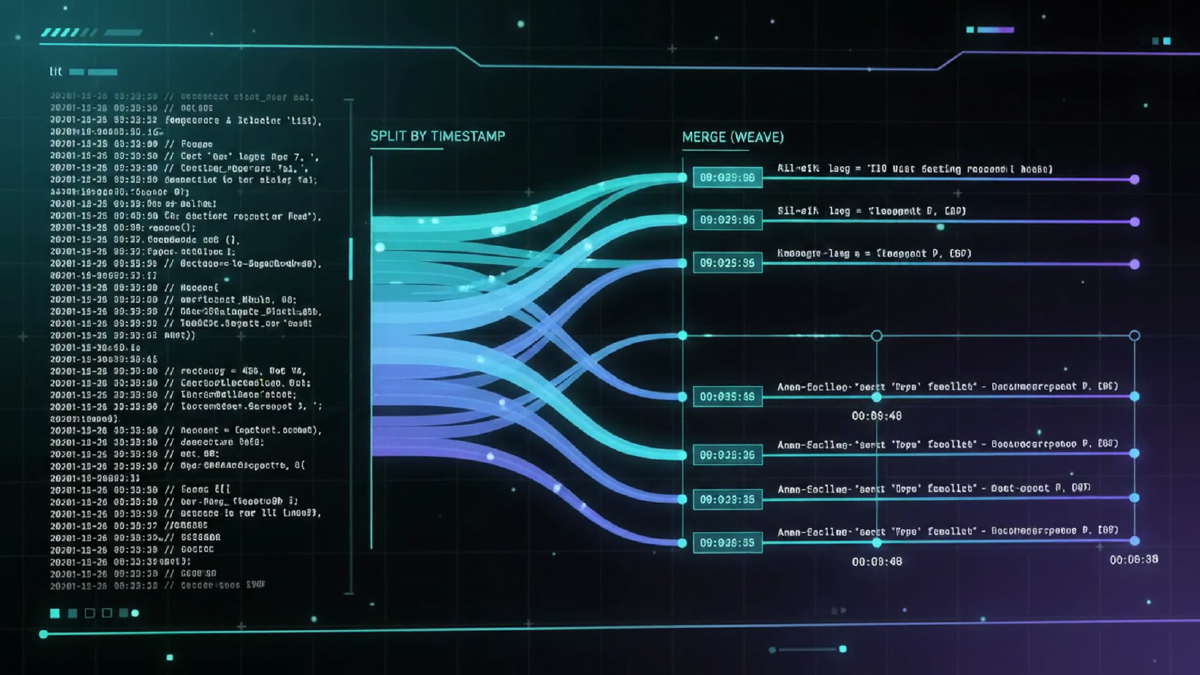
Over the years I often caught myself thinking “I wish there was a small piece of software to quickly find repeating patterns in a log file”, or “This log file actually has two log streams merged, wish I could split them with one click”, or perhaps “Need to merge these logs by timestamp to see the sequence of events between two subsystems.”.
It also struck me: perhaps my electronics background has biased me, but I often find myself approaching a log file as if it were a signal to process. Merging, splitting, frequency analysis, detection of spurious events — all of it has been done before in (digital) signal processing.
So finally, I just decided to implement a log signal processor software myself. Cue in Logwarp.
a library which can do this:
from logwarp.logfile import LogFile

lf = LogFile("path/to/a/logfile")
lf.vectorize()
lf.find_similar(slice(42, 67))
# ... ( prints list of locations of the similar parts of the file)Features#
I wanted to have a relatively small, local-only tool, easy to use without all the fuss of a large, deployed log analysis software. And I wanted it to support the common use cases I encountered over the years:
- merging (weaving together1) log files along a common axis, typically time
- splitting (unraveling) a file by a specific fragment or rule
- detecting anomalies, small divergences from a large sequence of log messages
- grouping log messages into blocks to create a visualization of the flow
- finding repeating sequences, and maybe determining how often do they repeat
- annotating the log file
Also, I really didn’t want to rely on the regular expressions, because those would have to be written for each and every log file (I wish all logs I have to work with follow the same format, but life ain’t a fairy tale).
With the explosion of LLMs and AI agents, all the tasks above can be quite easily completed using a single prompt. But what if you happen to run out of tokens2? Is it possible to tackle these tasks with no a priori knowledge of the schema or format, and no AI at all? Yes — using math.
Log signal processing? How’s that work?#
Every log file in this world has a few things in common:
- it is typically a set of messages, one per line (think: samples)
- there is some form of a time stamp
- it may include common meta-data, like log level
- line-to-line, exact values may change, but their semantics don’t
Example from my own system’s journal:
paź 04 20:09:35 i2c i2c-5: Successfully instantiated SPD at 0x50
paź 04 20:09:45 i2c i2c-5: Successfully instantiated SPD at 0x52
The two lines carry essentially the same information:
[timestamp] [module]: Successfully instantiated SPD at [I2C address]Yet, when doing a text compare of two separate files containing these journal messages, everything would be marked as different — timestamps differ, addresses differ. But in the grand scheme of things, the two lines simply say: “Your DIMMs work correctly”.
If, however, the second journal file read:
paź 04 20:09:35 i2c i2c-5: Successfully instantiated SPD at 0x50
paź 04 20:09:45 i2c i2c-5: Failed to instantiate SPD at 0x52: unspecified error
A text compare of these files would flag differences too. And that’s the point: text compare treats all of this as “different”, so you might not notice that something is wrong. If, however, the messages were reduced to:
[timestamp] [module]: Successfully instantiated SPD at [I2C address]
[timestamp] [module]: Failed to instantiate SPD at [I2C address]: unspecified error
it’s much easier to spot; less noise clouding the actual important information.
So, how to categorize and group log file messages without a priori knowledge about the schema? How to give semantic meaning to messages without employing a LLM? It’s simple: you don’t!
Wait, what?#
For algorithmic processing, it is enough to categorize the messages in a log file without assigning a full semantic meaning to them, just some meaning. Think along the lines of: “Here is a pile of numbers, over there is another pile of the same count of numbers”, “This token contains only letters”, “This fragment mixes everything”.
By assigning a numeric value to each class of characters (let’s call it a weight) and using those weights to convert each line of a log file, we get a vector of numeric values per line. We can even tune which classes of characters are emphasized in the converted (vectorized) log file by adjusting the weights. In this way, a log file becomes a signal, represented as a vector of floating-point numbers.

Numbers are something we can work with — they can be processed with math. When we apply this to the entire log file, we get a matrix, which is even better, because computers these days are all about processing matrices.
But, to simply visualize a signal, a 2D matrix isn’t always ideal. That’s why we can reduce dimensionality of the signal, for example by calculating Root Sum Square of each vector3:
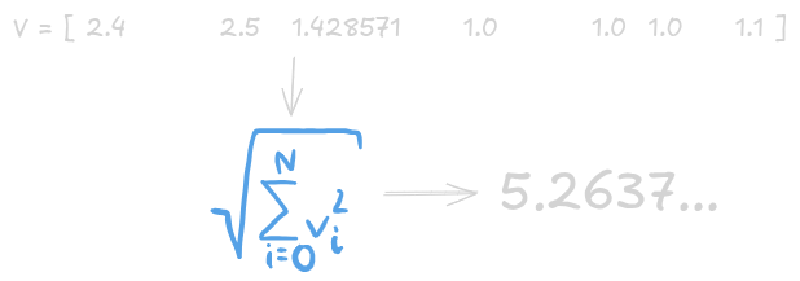
By applying that to an entire file, we’ll get a nice list of values, with each one representing a line in the log. So, for an actual example, let’s take one of the Logwarp’s sample log files. It’s your typical journal file:
...
paź 04 16:43:10 garuda kernel: BIOS-e820: [mem 0x00000000ff000000-0x00000000ffffffff] reserved
paź 04 16:43:10 garuda kernel: BIOS-e820: [mem 0x0000000100000000-0x000000041effffff] usable
paź 04 16:43:10 garuda kernel: NX (Execute Disable) protection: active
paź 04 16:43:10 garuda kernel: APIC: Static calls initialized
paź 04 16:43:10 garuda kernel: efi: EFI v2.3.1 by American Megatrends
paź 04 16:43:10 garuda kernel: efi: ACPI=0xdf1b2000 ACPI 2.0=0xdf1b2000 SMBIOS=0xf04c0 INITRD=0xcf2e1d98
paź 04 16:43:10 garuda kernel: efi: Remove mem126: MMIO range=[0xf8000000-0xfbffffff] (64MB) from e820 map
paź 04 16:43:10 garuda kernel: e820: remove [mem 0xf8000000-0xfbffffff] reserved
paź 04 16:43:10 garuda kernel: efi: Not removing mem127: MMIO range=[0xfec00000-0xfec00fff] (4KB) from e820 map
paź 04 16:43:10 garuda kernel: efi: Not removing mem128: MMIO range=[0xfed00000-0xfed03fff] (16KB) from e820 map
...
but for the most part it’s just about the shortcomings of Bluetooth:
...
paź 04 17:18:43 garuda kernel: Bluetooth: hci0: RTL: RTL: Read reg16 failed (-110)
paź 04 17:18:43 garuda systemd[1578]: Stopped target Bluetooth.
paź 04 17:18:43 garuda systemd[1]: Stopped target Bluetooth Support.
paź 04 17:18:43 garuda kernel: usb 1-1.1: reset full-speed USB device number 6 using xhci_hcd
paź 04 17:18:43 garuda systemd[1578]: Reached target Bluetooth.
paź 04 17:18:43 garuda systemd[1]: Reached target Bluetooth Support.
paź 04 17:18:45 garuda kernel: Bluetooth: hci0: command 0xfc61 tx timeout
paź 04 17:18:45 garuda kernel: Bluetooth: hci0: RTL: RTL: Read reg16 failed (-110)
paź 04 17:18:45 garuda kernel: Bluetooth: hci0: RTL: Failed to generate devcoredump
paź 04 17:18:45 garuda kernel: Bluetooth: hci0: Resetting usb device.
...
Scrolling through the file, you’ll see that these messages repeat, well, all over the place. Let’s run Logwarp on it:
| |
and the outcome is:
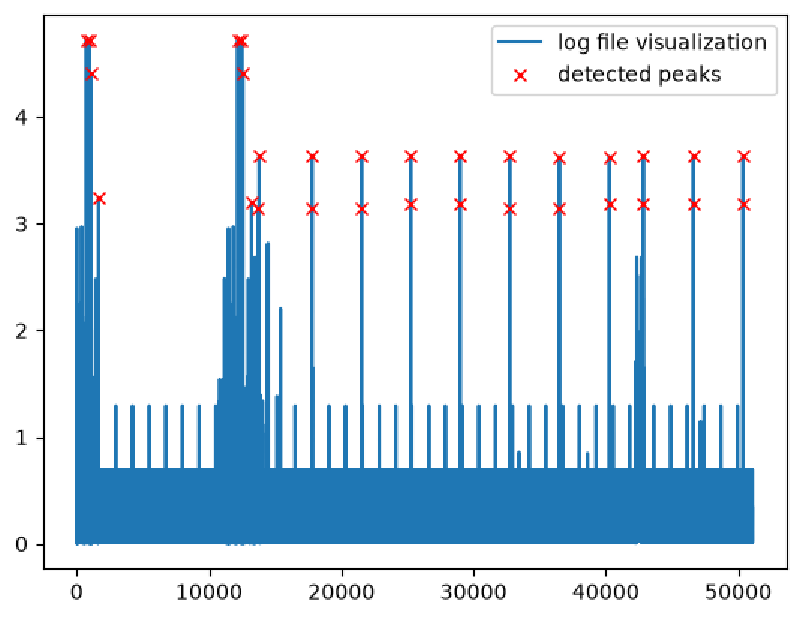
Notice line 13 in the code snippet above — it calls the find_distinctive()
method on the vectorized log file, which essentially finds peaks in the signal.
What if we take those peak indices and look up the corresponding lines in the
log file?
distinctive = lf.find_distinctive()
lf[distinctive]
We get back only the lines that stand out from their neighbours, effectively filtering out the noise in the signal:
 'paź 04 16:43:10 garuda systemd[1]: systemd 258-4-arch running in system mode (+PAM +AUDIT -SELINUX +APPARMOR -IMA +IPE +SMACK +SECCOMP +GCRYPT +GNUTLS +OPENSSL +ACL +BLKID +CURL +ELFUTILS +FIDO2 +IDN2 -IDN +IPTC +KMOD +LIBCRYPTSETUP +LIBCRYPTSETUP_PLUGINS +LIBFDISK +PCRE2 +PWQUALITY +P11KIT +QRENCODE +TPM2 +BZIP2 +LZ4 +XZ +ZLIB +ZSTD +BPF_FRAMEWORK +BTF +XKBCOMMON +UTMP -SYSVINIT +LIBARCHIVE)',
 'paź 04 16:43:14 garuda systemd[1]: systemd 258-4-arch running in system mode (+PAM +AUDIT -SELINUX +APPARMOR -IMA +IPE +SMACK +SECCOMP +GCRYPT +GNUTLS +OPENSSL +ACL +BLKID +CURL +ELFUTILS +FIDO2 +IDN2 -IDN +IPTC +KMOD +LIBCRYPTSETUP +LIBCRYPTSETUP_PLUGINS +LIBFDISK +PCRE2 +PWQUALITY +P11KIT +QRENCODE +TPM2 +BZIP2 +LZ4 +XZ +ZLIB +ZSTD +BPF_FRAMEWORK +BTF +XKBCOMMON +UTMP -SYSVINIT +LIBARCHIVE)',
 'paź 04 16:43:14 garuda systemd[1]: /usr/lib/systemd/system/grub-btrfs-snapper.service:11: Ignoring unknown escape sequences: "if [[ -z $(/usr/bin/findmnt -n / | /usr/bin/grep "\\.snapshots") ]]; then if [ -s "${GRUB_BTRFS_GRUB_DIRNAME:-/boot/grub}/grub-btrfs.cfg" ]; then /etc/grub.d/41_snapshots-btrfs; else ${GRUB_BTRFS_MKCONFIG:-grub-mkconfig} -o ${GRUB_BTRFS_GRUB_DIRNAME:-/boot/grub}/grub.cfg; fi; fi"',
 'paź 04 16:43:22 garuda systemd[1]: Startup finished in 15.053s (firmware) + 778ms (loader) + 1.523s (kernel) + 3.156s (initrd) + 8.267s (userspace) = 28.778s.',
 'paź 04 20:09:31 garuda systemd[1]: systemd 258-4-arch running in system mode (+PAM +AUDIT -SELINUX +APPARMOR -IMA +IPE +SMACK +SECCOMP +GCRYPT +GNUTLS +OPENSSL +ACL +BLKID +CURL +ELFUTILS +FIDO2 +IDN2 -IDN +IPTC +KMOD +LIBCRYPTSETUP +LIBCRYPTSETUP_PLUGINS +LIBFDISK +PCRE2 +PWQUALITY +P11KIT +QRENCODE +TPM2 +BZIP2 +LZ4 +XZ +ZLIB +ZSTD +BPF_FRAMEWORK +BTF +XKBCOMMON +UTMP -SYSVINIT +LIBARCHIVE)',
 'paź 04 20:09:34 garuda systemd[1]: systemd 258-4-arch running in system mode (+PAM +AUDIT -SELINUX +APPARMOR -IMA +IPE +SMACK +SECCOMP +GCRYPT +GNUTLS +OPENSSL +ACL +BLKID +CURL +ELFUTILS +FIDO2 +IDN2 -IDN +IPTC +KMOD +LIBCRYPTSETUP +LIBCRYPTSETUP_PLUGINS +LIBFDISK +PCRE2 +PWQUALITY +P11KIT +QRENCODE +TPM2 +BZIP2 +LZ4 +XZ +ZLIB +ZSTD +BPF_FRAMEWORK +BTF +XKBCOMMON +UTMP -SYSVINIT +LIBARCHIVE)',
 'paź 04 20:09:34 garuda systemd[1]: /usr/lib/systemd/system/grub-btrfs-snapper.service:11: Ignoring unknown escape sequences: "if [[ -z $(/usr/bin/findmnt -n / | /usr/bin/grep "\\.snapshots") ]]; then if [ -s "${GRUB_BTRFS_GRUB_DIRNAME:-/boot/grub}/grub-btrfs.cfg" ]; then /etc/grub.d/41_snapshots-btrfs; else ${GRUB_BTRFS_MKCONFIG:-grub-mkconfig} -o ${GRUB_BTRFS_GRUB_DIRNAME:-/boot/grub}/grub.cfg; fi; fi"',
 'paź 04 20:09:43 garuda systemd[1]: Startup finished in 15.951s (firmware) + 776ms (loader) + 784ms (kernel) + 2.683s (initrd) + 9.308s (userspace) = 29.505s.',
 'paź 04 20:09:55 garuda plasmashell[4907]: qml: 9.2 3.9 10.8 61 100 17.7 0 0 9 8.7 8.6 8.6 8.9 61 61 61 3 3',
 ...
See? Not one mention of Bluetooth in there.
Finding Similarities#
Typically, finding similar lines in a log is not easy, because it is difficult to quantify similarities of a text. Typically, you can’t simply highlight a line or a file fragment, click “Find similar”, and enjoy the results4. Timestamps change all the time, values may vary… it’s not a simple search. Regular expressions can be used here, but you know the old saying:
You have a problem and you decided to solve it using regular expressions. Now you have two problems.
But our log file has already been converted to a 2D matrix of numbers. And we can compare numbers, right?
Let’s take a look at the line number 12 in the sample log:
-- Boot 65d7a8f0c2a846c09aa0a7af806cc7c9 --We could find similar lines to this one using a fairly simple regular expression, sure. But maybe we don’t have to write that expression, just do:
similar = lf.find_similar(12, step=1)And we, in fact, can. Logwarp takes the specified line in its vectorized form and searches for similar vectors:
>>> print(similar)
[11467]
>>> print(lf[similar])
['-- Boot 6ab2431495de4493b3f57cd86e06f666 --']
We can even find similar chunks of the file:
>>> slc = slice(10849, 10853)
>>> lf[slc]
['paź 04 17:19:56 garuda kernel: usb 1-1.2.1.3: New USB device found, idVendor=046d, idProduct=c52b, bcdDevice=12.11',
 'paź 04 17:19:56 garuda kernel: usb 1-1.2.1.3: New USB device strings: Mfr=1, Product=2, SerialNumber=0',
 'paź 04 17:19:56 garuda kernel: usb 1-1.2.1.3: Product: USB Receiver',
 'paź 04 17:19:56 garuda kernel: usb 1-1.2.1.3: Manufacturer: Logitech']

>>> similar = lf.find_similar(slc, step=1)
>>> lf[similar]
[10753, 10763, 10770, 11026, 11033, 11040, 11110, 12299, 12312, 12321, 12592, 14015, 42255, 42311, 42320, 42662]

>>> lf[10753:10753+4]
['paź 04 17:19:53 garuda kernel: usb 1-1.2: New USB device found, idVendor=05e3, idProduct=0610, bcdDevice=65.20',
 'paź 04 17:19:53 garuda kernel: usb 1-1.2: New USB device strings: Mfr=1, Product=2, SerialNumber=0',
 'paź 04 17:19:53 garuda kernel: usb 1-1.2: Product: USB2.1 Hub',
 'paź 04 17:19:53 garuda kernel: usb 1-1.2: Manufacturer: GenesysLogic']
Again, no painstaking creation of a multi-line regular expression, no need for defining schema of the file, and no associated token cost. Just “find me similar fragments”.
So, what’s next?#
Finding similar fragments or distinctive lines in a file is just a very basic usage. Next in line, which might be a bit of a challenge, would be to apply the more advanced signal processing methods to this, and see what comes out of it.
Yes, the loom analogy kept popping up5, but “logweave” was already taken ↩︎
Or, like me, are too cheap to get a subscription? ↩︎
We could simply sum all values in a vector, but where’s the fun in that? ↩︎
Yes, I know, LLMs can do that now, but I wonder what a 500MB log file would do to the context window and input token cost. ↩︎
One might even say it was looming… ↩︎